How IRPC boosts strategic reporting with thinkcell professional presentations

Faster presentation creation
Reduction in chart creation time
Manual updates
About IRPC
IRPC Public Company Limited, a leading integrated petrochemical company based in Thailand, operates in oil refining, petrochemical production, and petroleum exploration. With a commitment to innovation, sustainability, and corporate excellence, IRPC plays a crucial role in driving Thailand’s economic growth. At the helm of the Corporate Strategy and Sustainability division is Jakkawal Permyanwanthana, Senior Manager IRPC Strategic Planning and Sustainability Office, who has been a key player in the company for over two decades.
|
Company name |
IRPC Public Company Limited |
|
|
Headquarters |
Rayong province, Thailand |
|
|
Employee count |
5000+ |
|
|
Industry |
Oil and Gas |
|
|
Website |
Challenges faced
As a Senior Manager, Jakkawal’s responsibilities include creating data-intensive presentations for top management, external stakeholders, investors, and auditors. The demand for high-quality, professional presentations was ever-increasing, especially in areas such as corporate strategy, sustainability, and performance reporting. The challenges were clear:
To elevate the quality of presentations to meet the high expectations of internal and external audiences.
To reduce the significant amount of time spent on creating complex charts and professional slides.
To minimize the noise in presentations to enhance the impact of the data being communicated.

We needed a solution that could bring professionalism to our slides, reduce time to create charts, and cut down on unnecessary elements that distracted from the core message.
How thinkcell helped through professional slides and charts
After being introduced to thinkcell by a major management consulting firm over 15 years ago, Jakkawal immediately recognized its potential. He advocated for its adoption at IRPC, successfully getting it added to the company’s vendor list. thinkcell became an essential tool, particularly for the Corporate Strategy team, and even extended its usage to some members of the IT team.
Key features utilized
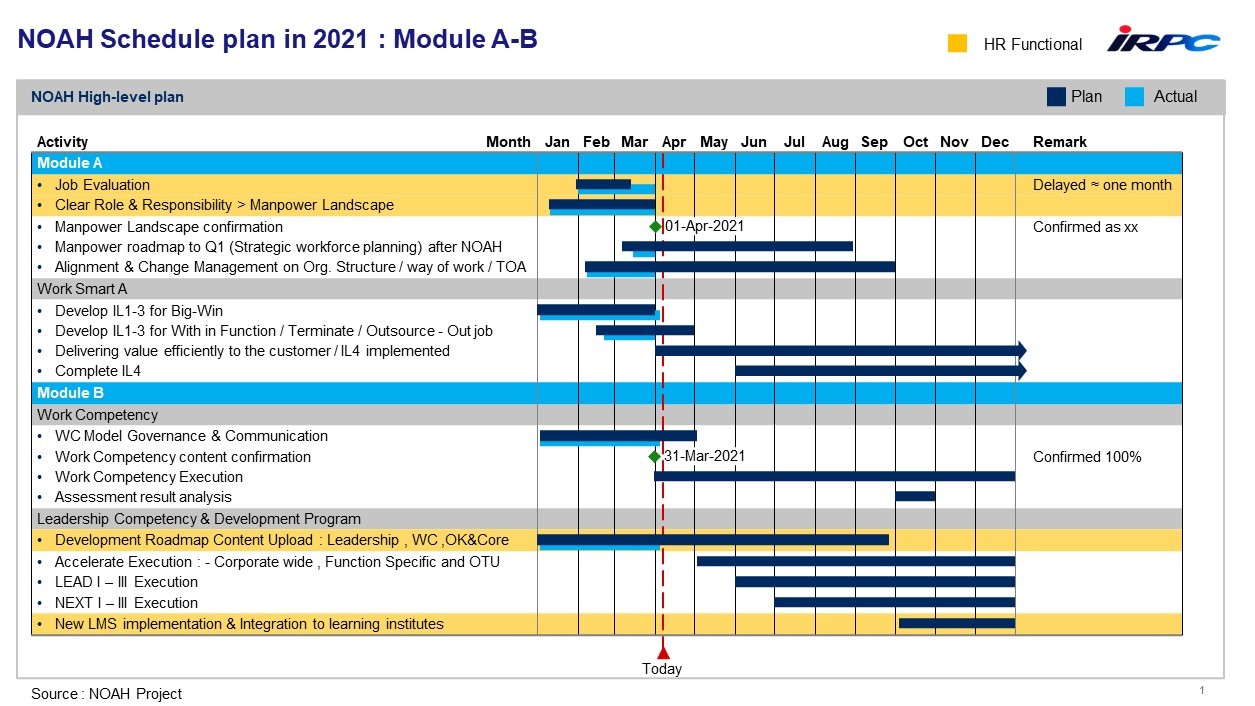
- Gantt charts: Helps in visualizing project plan especially with dates from Excel directly. Sample chart below showcases the use of thinkcell Gantt chart at IRPC.
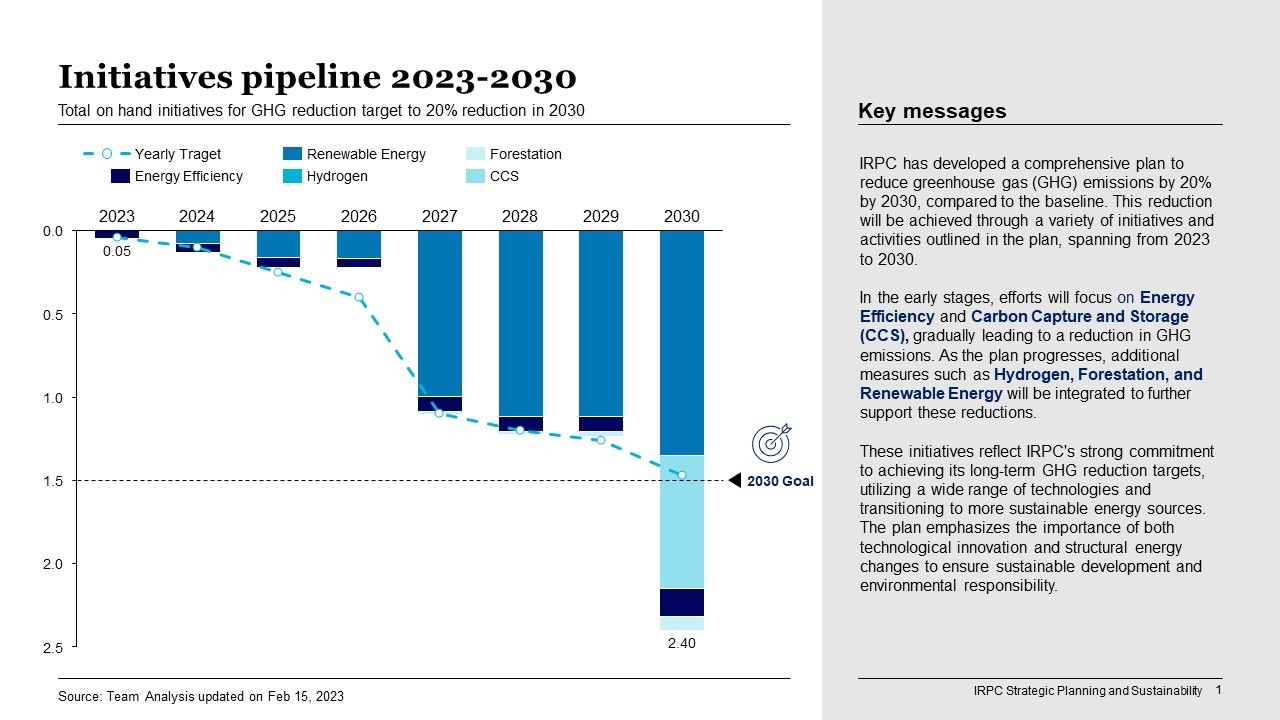
- Combination charts: Makes it easy to see one set of information presented in relationship with other data, aiding strategic analysis. Sample chart below showcases the use of thinkcell combination chart at IRPC.
- Split Agenda: Helps in making professional presentations that are cleaner and more organized.
- Save & Send Slides: Assists enhanced collaboration, for example, by sharing specific slides for team’s feedback.
- Other charts:
- Bubble charts: Particularly useful in organizing individual data points into groups.
- Waterfall charts: Helps in simplifying complex data, which has been challenging to create in native PowerPoint.


Jakkawal noted:
thinkcell has been an amazing tool that not only helped us overcome the challenges but also provided features that made our presentations stand out. The intelligence of these features sometimes makes me wonder why PowerPoint doesn't have them natively.
Results
The impact of implementing thinkcell at IRPC has been profound. Jakkawal estimates that the tool has saved his team over 50% of the time they previously spent on creating data-driven presentations with professional slides.
If I need 10 minutes to create a chart natively in PowerPoint, thinkcell reduces this to just 3-5 minutes.
he explained.
This time savings has allowed the team to focus more on strategic analysis and less on the mechanics of chart creation. Additionally, the professionalism of IRPC’s presentations has significantly improved, enhancing the company's image in the eyes of stakeholders and investors.
Business impact
A substantial reduction in the time required to create complex charts and professional slides.
Ensuring that data is presented clearly and correctly, reducing the risk of miscommunication.
The ability to quickly share specific slides with team members for input has improved the overall workflow.
Jakkawal further emphasized:
I haven’t created a chart using PowerPoint for more than 10 years now. If thinkcell were taken away from me, let’s say due to budget constraints, I’d rather let go of the budget for some other software but not thinkcell
Q&A with Jakkawal Permyanwanthana
Q: What types of reports do you typically create using thinkcell?
A: We create a variety of reports, including yearly corporate strategy reports, sustainability reports, and quarterly/monthly performance reports. thinkcell is crucial in helping us present these reports in a clear and professional manner.
Q: What are your most loved features of thinkcell?
A: The features I rely on the most are Gantt charts, Bubble charts, Stacked column charts, Mekko charts, Split Agenda and the Save & Send Slides feature. thinkcell makes using these features incredibly intelligent and intuitive.
Experience the same transformation in your presentations
- No credit card needed
- Unlimited access to all thinkcell Suite features
- Automatically expires after trial duration
Explore this topic further with AI:
Read more

See how Bank of Georgia’s Analytics team reduced report creation time by 50% with thinkcell, improving decision-making and communication.

Discover how Almirall, a global pharmaceutical company, improved their productivity and streamlined reporting with thinkcell.

Hear how the Vaillant Group, world market leader in central hydronic heating units. uses thinkcell to boost the efficiency of their financial reporting processes.