KB0160:复制不相邻单元格的多重选择失败
问题
无法将不相邻单元格的多重选择复制到 thinkcell 数据表中。当多选多个不相邻的单元格(例如按住 Ctrl 键并依次点击这些单元格),然后将这些单元格复制/粘贴到 thinkcell 的内部数据表时,中间未选中的单元格也会被粘贴。

- 源工作表:复制单元格 A1、A3、A5 > 目标工作表:粘贴 A1:A5
说明
这是 Excel 的设计限制。thinkcell 的内部数据表基于 Excel,但它是一个单独的 Excel 进程。在将不相邻单元格复制/粘贴到单独的 Excel 进程时,即使不使用 thinkcell,也可以复现该问题。 阅读更多
不使用 thinkcell 复现:
- 打开 Excel,并在单元格 A1 到 A5 中输入一些数字。
- 按住 Ctrl 键并点击单元格 A1、A3 和 A5(如上方屏幕截图所示)以选择它们。复制所选内容。
- 右键点击任务栏中的 Excel 图标,然后点击 Microsoft Excel 20…
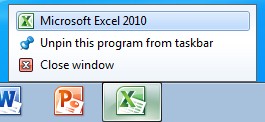
- 粘贴(例如按 Ctrl + V)。

结果:未选中的单元格 A2 和 A4 也被粘贴。
我们已将此问题作为案例 112021442496011 提交给 Microsoft Office Support。Microsoft Office Support 表示,此行为目前尚未记录在文档中,但属于“by design”。 阅读更多
“This behavior is by design.
When you use the clipboard for copy and paste, you are using a feature that is designed to work across all office applications. Since this is the case, the clipboard uses HTML code for storing and then pasting data. The HTML code is limited to a range select and you get all the data in the range including the cells you did not select. It is creating a table in HTML code and uses this table for the paste action. This allows the clipboard to share data from Excel to other office applications such as Word, Power Point, and other instances of Excel outside this workbook.
When you use Ctrl-C and then follow it up with Ctrl-V instead of using the clipboard you are using an internal Excel single instance copy feature that allows Excel to copy only the selected cells. This gives you the desired behavior. The clipboard has limits due to the fact that it shares with all office applications. The limit to the clip board was planned due to the huge amount of data that would be required to do a simple copy and paste. Large copy actions would overwhelm the system and cause huge slowdowns in performance. The HTML copy is a stripped down version of the internal copy and therefore there are differences and limits.” (Microsoft Office Support)