KB0160: 隣接していないセルの複数選択のコピーに失敗する
問題
隣接していないセルの複数選択を thinkcell データシートにコピーすることはできません。たとえば Ctrl キーを押しながらセルをクリックして、隣接していない複数のセルを選択し、そのセルを thinkcell の内部データシートにコピーして貼り付けると、間にある未選択のセルも貼り付けられます。

- コピー元シート: セル A1、A3、A5 がコピーされる > コピー先シート: A1:A5 が貼り付けられる
説明
これは Excel の設計上の制限です。thinkcell の内部データシートは Excel を基盤としていますが、別の Excel プロセスです。この問題は、隣接していないセルを別の Excel プロセスにコピーして貼り付ける場合にも、thinkcell なしで再現できます。 もっと読む
thinkcell を使用しない再現手順:
- Excel を開き、セル A1 から A5 に数値を入力します。
- Ctrl キーを押したまま、セル A1、A3、A5 をクリックして選択します(上のスクリーンショットのように)。選択範囲をコピーします。
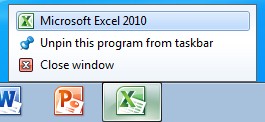
- タスク バーの Excel アイコンを右クリックし、Microsoft Excel 20… をクリックして、別の Excel プロセスを起動します。
- 貼り付けます(例: Ctrl + V を押します)。

結果: 未選択のセル A2 と A4 も貼り付けられます。
この問題については、ケース番号 112021442496011 として Microsoft Office Support に報告済みです。Microsoft Office Support によると、この動作は現時点では文書化されていませんが、「仕様」です。 もっと読む
“This behavior is by design.
When you use the clipboard for copy and paste, you are using a feature that is designed to work across all office applications. Since this is the case, the clipboard uses HTML code for storing and then pasting data. The HTML code is limited to a range select and you get all the data in the range including the cells you did not select. It is creating a table in HTML code and uses this table for the paste action. This allows the clipboard to share data from Excel to other office applications such as Word, Power Point, and other instances of Excel outside this workbook.
When you use Ctrl-C and then follow it up with Ctrl-V instead of using the clipboard you are using an internal Excel single instance copy feature that allows Excel to copy only the selected cells. This gives you the desired behavior. The clipboard has limits due to the fact that it shares with all office applications. The limit to the clip board was planned due to the huge amount of data that would be required to do a simple copy and paste. Large copy actions would overwhelm the system and cause huge slowdowns in performance. The HTML copy is a stripped down version of the internal copy and therefore there are differences and limits.” (Microsoft Office Support)